
Understand the main Aether Workshop tabs, panels, toolbar actions, and project surfaces.
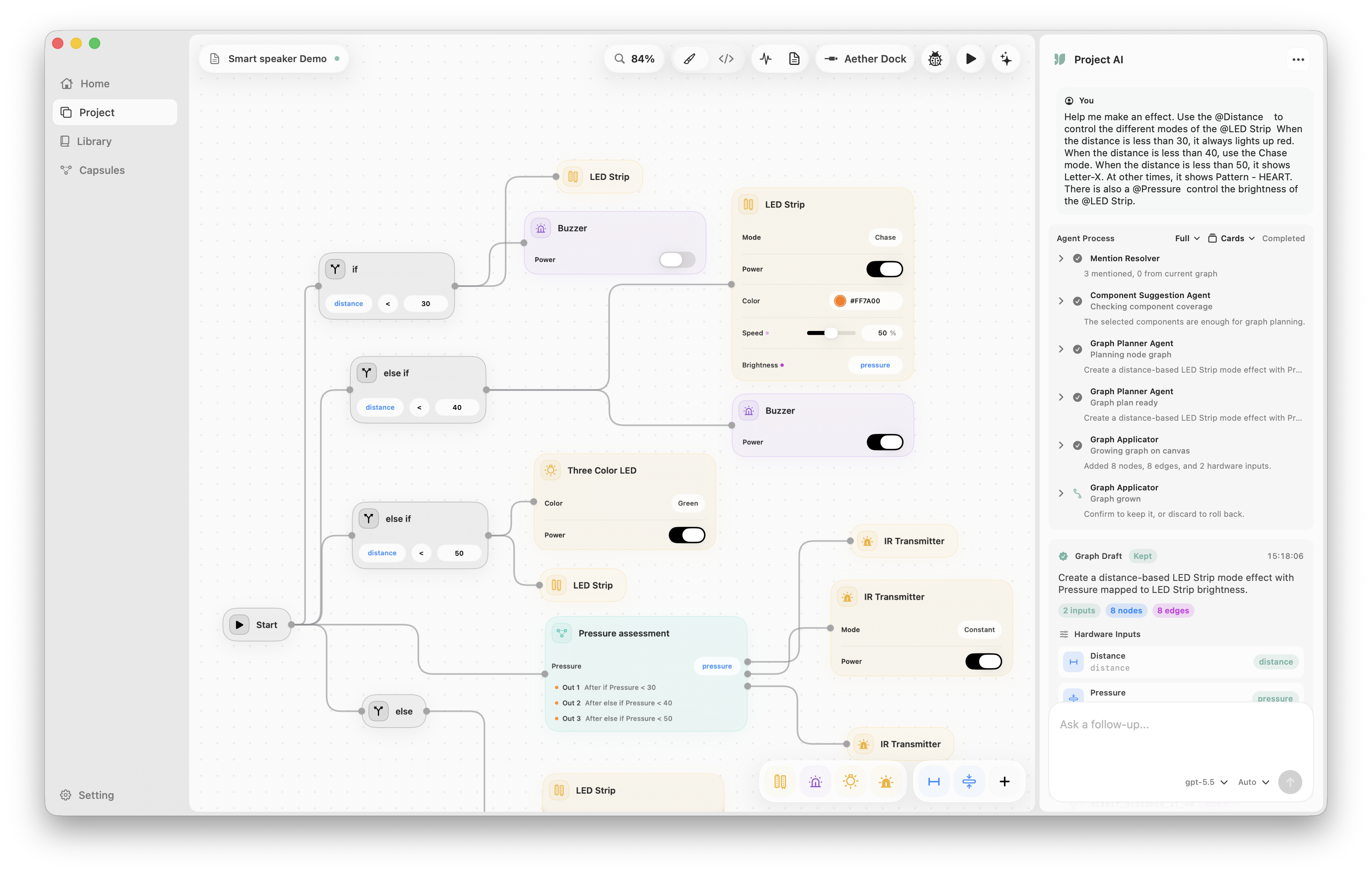
Main Tabs
Section titled “Main Tabs”Aether Workshop exposes five primary tabs:
- Home: create projects, open projects, and revisit recent work.
- Project: build hardware behavior on an infinite node canvas.
- Library: inspect, edit, create, and version Sense/Act component definitions.
- Capsules: manage reusable graph packages with input/output interfaces.
- Setting: configure Arduino CLI, boards, dependencies, hardware mappings, and AI providers.
Tutorial and News entries exist in the app model, but they are not enabled in the current visible tab set.
Project Toolbar
Section titled “Project Toolbar”The Project toolbar combines file state and hardware actions:
- Project file title and save status.
- Project comments, pin board, change log, and history.
- Zoom controls.
- Hardware port and manual pin controls.
- Serial monitor.
- Code preview.
- Serial port selection.
- Verify and Upload actions.
- AI panel toggle.
Canvas Behavior
Section titled “Canvas Behavior”The Project canvas supports pan, zoom, selection, copy/paste, undo/redo, node movement, and orthogonal connections. Dragging from a connection point can open a Node Picker with smart recommendations. Pressing Cmd+/ opens Quick Search.
Right AI Panel
Section titled “Right AI Panel”The Project AI panel can be resized or collapsed. It saves conversations inside the .aew project. Use it for graph planning, explanation, repair, and component suggestions. Graph changes are staged until you choose Keep Graph.
Library Editor
Section titled “Library Editor”The Library tab has a left component list, a central editor, and a preview/AI side panel.
- Sense components show Basic, Dependence, Code Blocks, and History tabs.
- Act components also include UI Elements.
- Built-in locked components such as random and serial utilities are read-only.
Capsules Editor
Section titled “Capsules Editor”Capsules are reusable graphs. Their editor focuses on internal nodes, exposed input/output ports, parameters, notes, checklists, project overrides, and version history.
Setting Tab
Section titled “Setting Tab”Settings are grouped into Hardware, Mapping, Dependence, and Aether AI. The app source includes a hidden Privacy tab and camera-related code, but that tab is not visible in the current UI.